|
WEB
SITE
Creation, Maintenance and Modification
Creating a web site:
There are many factors that go into designing a web site, and the range
of options is almost limitless. There more complicated a web page
is and the more original all the graphic work is, the more time it
takes, and the more costly it is.
The Elements of Design
The elements of design are the basic building blocks of all design
projects. The elements of design include lines, shapes, texture, color,
and direction. They create the general mood and tone of the web
site and can range from simple to complex, from modern to classic.
Two Types of Web
Sites:
Stable
and somewhat static: These web sites contain information that for the
most part remains unchanged over time. They do not require frequent
updating.
Changing:
These web sites contain information that is often changed and/or
updated, usually because it is time sensitive. As a result, someone
has to be responsible and able to carry out updates. How the web site
is built will determine who can update and how.
Two general ways to build
web sites:
Original
design: These web sites are often built using special web site design
software, such as Dreamweaver. This way of creating a web site
provides the most flexibility. At Eagle Online Services, we utilize
all coding systems as needed, including htm, html, css, asp, phb, java script, etc.
When it comes to original
design, this is the usual sequence of tasks:
1. Layout: This includes the header (banner), body and possible
footer. This also includes where things go in each section (i.e., a diagram
of the spacing and placement of things, including navigation, graphics and
text). A drawing, or sketch of the page layout can be my guide.
2. Pages: How many and whether they all have the same look (e.g.,
header).
3. Color scheme: Color samples help. An online search (using Google,
or some other search engine) "color palette," will provide a wide variety of
colors online that can be sampled and used. Also, the graphic software
we use has the full range of colors. It is important to know that
whatever colors are chosen, they won't falways look exactly the same on each
users monitor, because of the set-up for that monitor.
4. Content: Text and graphics.
We do things in this sequence, because what's at the top of the list is most
difficult to modify over time, while toward the bottom can more easily be
changed over time.
Templates: These are previously constructed by various sources.
They can be free, or purchased and are often built online. Templates
are less flexible, though they do posses means for modification. While
the overall design of the website is governed by the the template, text and
additional graphic content is added by the website developer.
At Eagle
Online Services we can do original design and use various templates that are
available to us.
Common
characteristics of web page layouts:
Header:
Usually this runs across the top of each page in the web site. It
contains identifying information, including logos and other sorts of
graphics.
Navigation: Web sites with multiple web pages need to have links on each
page that allow the web site visitor to view all pages. These are
usually navigation buttons that can appear vertically, or horizontally (navigation
on the website is horizontal).
Body:
This is the information, including graphics, that changes for each page
visited. The body can derive from the content of the page, or it can
be inserted from a source on the web site (e.g., a data base).
Footer:
Many web sites have a footer on each page, often used for copyright
information as well as additional links and basic information about the web
site. Like Headers, Footers do not change from page to page.
Below is a sample layout with four possible positions of the navigation.
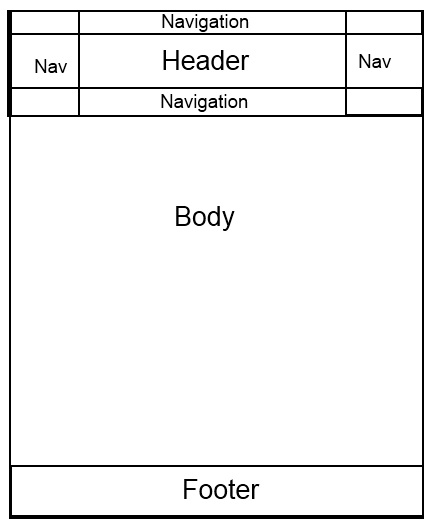
The various
elements of the layout can have spaces between them, or adjacent (as they
are in the diagram above.
Web page contents:
The contents go into the various sections
of the layout.
Text:
The text provides all the verbal information on the website.
Graphics:
These provide visual information.
They can be static, or animated. Static images can be used as
background (the Eagle Online Services website employs a blue image in the
background for each page) or they can be placed in strategic location in the
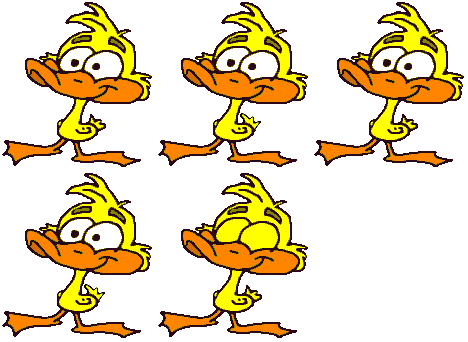
various sections of the layout. Below are examples of simple, animated graphics
we've used
.
 



Sample layouts/templates:
 for
a sample template (will open in a new
window, or tab)
for
a sample template (will open in a new
window, or tab)
for
another sample template (will open in
a new window, or tab)
Maintaining a web site:
As noted above, stable web
sites are primarily there to provide a source of basic information about
something. As long as that information does not change, they
require little maintenance.
On the other hand, those web
sites that contain time-sensitive information (e.g., a calendar of
events) require ongoing maintenance.
Modifying a web site:
This occurs when there is a
need to add or eliminate elements, or pages, and so on. It
involves a form of redesign.
This site hosted by
Atlantis
International
Copyright © 2000-2015 Eagle Online
Services. All right reserved.
Home
About
Online Promotion
Website Consultation
Fiction
Nonfiction
Website Pricing
Online Promotion Pricing
Writing
Pricing
Contact Us |
